Horton Hears a Whisper
← All PostsWe wanted a running summary of what gets talked about around the office. Not surveillance. More like a notebook the room fills in for itself. What was the kitchen conversation on Tuesday? What did the meeting room actually decide? You can’t be in every room at once, but a microphone can be.
So we wired a fleet of ESP32 mics around the office, streamed the audio to a server, ran it through Whisper, and built dashboards on top. Code name: Horton, after the Dr. Seuss elephant who hears tiny voices on a speck of dust.
One device, then more
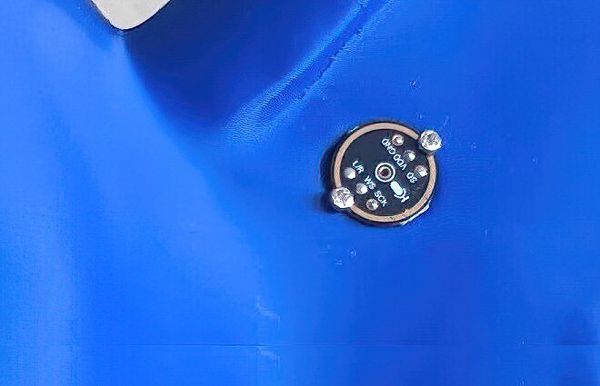
Horton started as one ESP32-S3 board on my desk with an I²S microphone (the digital audio bus most small mics speak over) wired to it, streaming raw audio over a TCP socket to a Python server. The server ran Whisper, dropped transcripts to disk, and that was the whole stack. It worked. The transcripts even made sense.
The problem with one device working is the obvious question that comes next: what would three of these look like? Then four. Then “what does the kitchen sound like at 11pm versus 3pm?” The minute you have more than one, you don’t really have devices anymore — you have a fleet, and you need to think about a fleet.
How it works
The loop is small. Audio goes in one end; transcripts come out the other.
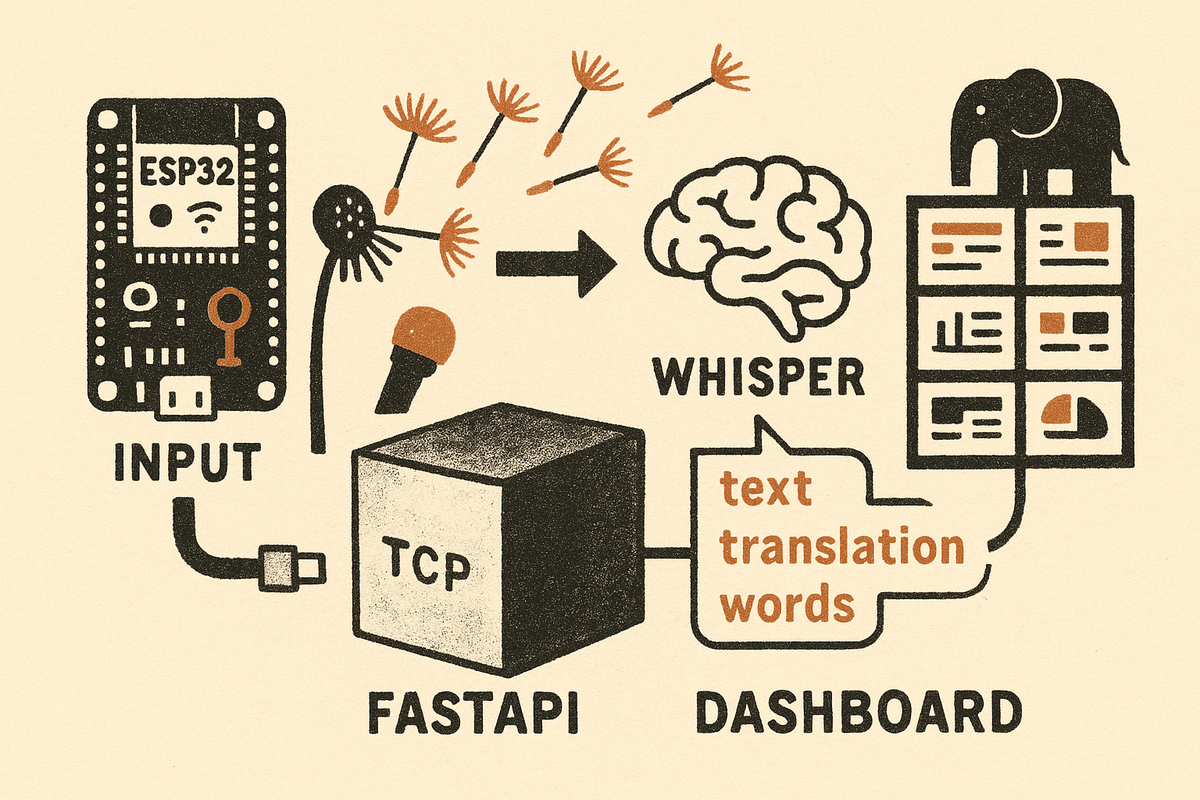
A small ESP32-S3 firmware reads raw audio off the I²S microphone and streams it continuously over a TCP socket to the server. The server is a FastAPI app with two processes: audio_server.py handles the TCP audio ingest, and web_server.py serves the dashboard, the API, and the live feed. Whisper (we use faster-whisper, a CPU-optimized port of OpenAI’s Whisper) does the transcription. Grafana, with the server’s API as a datasource, draws the dashboards.
The transcription backend is hot-swappable: set ASR_BACKEND=whisper or ASR_BACKEND=parakeet in the env and the server picks one at boot. More on that in a minute.
Where we got stuck
The YouTube ghosts
When we first wired everything up, the ESP32s were streaming whatever they heard, including hours of mostly-silence. Whisper, asked to transcribe silence, will do its best. And its best is to hallucinate. Pages of:
- “Thanks for watching!”
- “Thank you.”
- “Amen.”
And one beautiful, increasingly unhinged stretch:
“I’m not going to leave you alone. You’re not going to leave me alone.”
Whisper trained on YouTube, and when given nothing to work with, it does what YouTube does: it tells you to like and subscribe. The transcripts read like a séance with the algorithm. It was funny for about a day.
What it actually meant was that we’d be transcribing silence forever if we didn’t gate the input. We landed on two layers of defense, both server-side. First, we turned on faster-whisper’s built-in voice-activity detection (VAD), which skips audio chunks below a speech-confidence threshold before they ever reach the transcription model. Second, we added a small blocklist of the known Whisper hallucinations — “Thanks for watching,” “Amen,” and friends — so if the model still emits one of those on a chunk that did pass VAD, we drop it on the floor. Whisper got quieter immediately. The YouTube ghosts moved on.
The fleet got IDS-banned
The next surprise didn’t come from the audio side. It came from the network.
After we’d flashed a few more boards and put them around the office, two of them (the kitchen board and the horton board, ironically) started failing to associate with the AP. The serial logs showed the same line over and over:
WiFi disconnected, reason=2
reason=2 is AUTH_EXPIRE, ESP-IDF’s code for “the AP told us to go away.” We thought it was bad credentials, until we realized the credentials hadn’t changed and the other boards were fine.
The actual cause: the UniFi router was quarantining the two boards as a brute-force association attempt. Every time their WiFi stack lost the connection (which was often, because the firmware would immediately try to reconnect on every disassociation event), it counted as a new association attempt. Enough of those in a short window and the IDS (intrusion detection system) rule blocks the MAC.
The fix landed in firmware v0.2.4: exponential backoff on reassociation, so the boards stop hammering the AP the second they get kicked. The release note for that version frames it as a politeness feature, but it’s not — it’s “stop getting your own fleet IDS-banned.”
We laughed about it for a while. The Dr. Seuss elephant project was, briefly, an internet threat actor.
Dashboards
There are two surfaces. One for acting on the fleet, one for watching it.
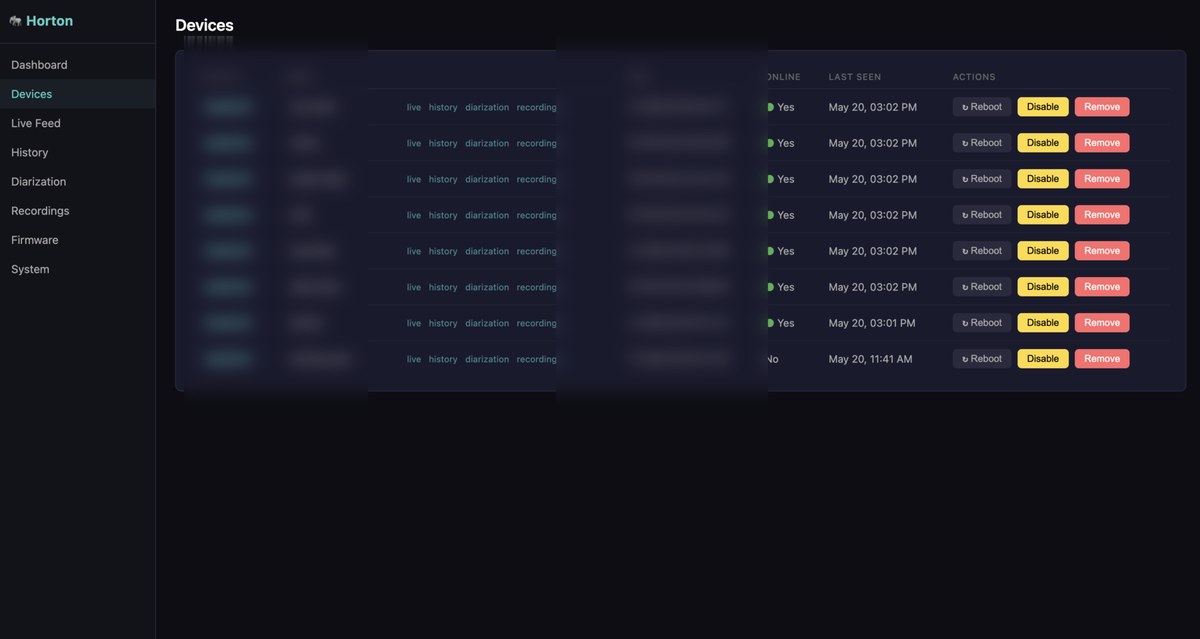
The admin dashboard is small and unfashionable on purpose: one FastAPI app, one HTML file, no framework, no single-page app. The pages are: Dashboard, Devices, Live Feed, History, Diarization (speaker labeling, who said what), Recordings, Firmware, System Status. Most do what their names say; two are worth calling out.
Devices is where new boards land. Flash a fresh ESP32, power it on, and it phones home, but it goes into a Pending list at the top of the page, and nothing it sends is accepted until an admin clicks Approve and gives it a name (kitchen, desk, meeting-room). One-click human gate before any new device is trusted.
Firmware is OTA (over-the-air updates). Upload a binary and it becomes the current firmware; devices pick it up at their next check-in. The page shows a table of every device with running version next to the latest available, so the stragglers are easy to spot, plus an upload history for rollbacks. OTA is gated on firmware ≥ v0.2.1; anything older needs one more USB flash to learn how to update itself.
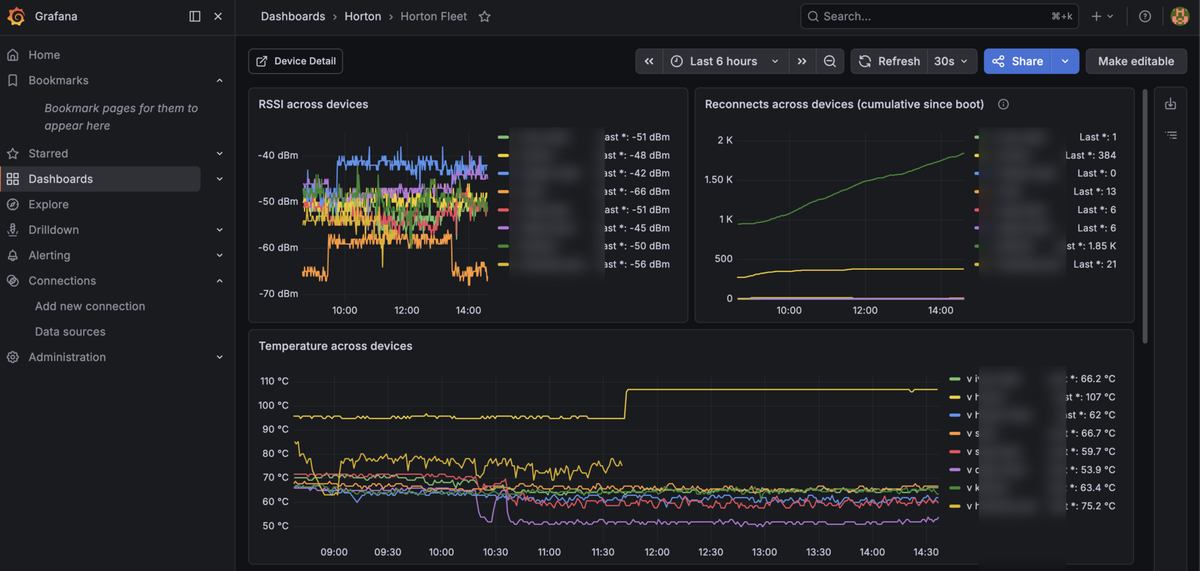
Grafana sits alongside, pointed at the same SQLite store the API reads from. The admin dashboard is for individual actions; Grafana is for patterns across the fleet. The trick that made it actually useful was going cross-device on every panel: RSSI (WiFi signal strength) between devices on one chart, temperature across devices on another, transcriptions-per-hour by device on a third. That way you’re looking for the outlier, not mentally diffing four identical-looking charts. The current Fleet dashboard has a reconnects timeseries (a leading indicator of “this device is about to fall over”), a firmware-version pie chart (a leading indicator of “we forgot to flash one of them”), an uptime table, and the transcription-rate panel that quietly tells you which room is talking the most. A separate Device Detail dashboard handles the per-device deep-dive.
Broadcast
The dashboards are for us. What about everyone else?
Every transcription Horton produces also gets published to an MQTT broker (a lightweight publish/subscribe messaging bus) as soon as it lands, on two topics:
horton/transcriptions/<device-name>   ← e.g., horton/transcriptions/kitchen
horton/transcriptions/all             ← fanout: every transcription, every device
The payload is a small JSON blob with device, mac, text, and timestamp. The whole publisher is one file (lib/mqtt.py) that’s lazy-initialized at first use and gated on a single MQTT_ENABLED=true env var. If the broker’s down or unreachable, the publish fails quietly and the rest of the pipeline keeps going. No transcription should ever block on a downstream subscriber.
The dashboards are how we read the room. MQTT is how anything else can read it. We didn’t want to be the ones deciding what counts as an interesting use of the transcripts.
The first thing that subscribed was a Slack bot called Overheard. It listens to horton/transcriptions/all, takes what it hears, and posts to a Slack channel. But it doesn’t just forward the raw text. Overheard turns each transcript into a short, dry, slightly editorial line, like a coworker stage-whispering the gist of what just happened in the next room. It tags posts with things like #transcript and #subtweet. Reading the channel feels less like watching a feed and more like getting commentary on the office from an invisible roommate.

Overheard isn’t a limitation of Horton. It’s a layer on top, and that’s the point. We don’t actually want a raw feed of every word the office says in Slack; that would be both noisy and a little creepy. We want the vibe of what’s being talked about. Overheard provides that translation, and it lives downstream of Horton, not inside it. Horton stays a generic transcription bus; Overheard is one opinion about what to do with it.
We can imagine plenty we haven’t built: a summarizer that emits one line per room per hour, a Home Assistant integration that fires on keywords, a live translator for non-English speakers in the office. (Someone will eventually wire up an LLM that fact-checks the meeting room. Maybe don’t.)
The point is we don’t have to. Horton publishes; the world subscribes.
The small things
A few decisions don’t deserve their own section but added up to a project that’s actually nice to live with.
Names, not MACs. The first version stored audio by MAC address. The first time I tried to find recordings from “the kitchen one” by scrolling through A4:CF:12:… folders, I knew that wasn’t going to last. Now there’s a thin layer of symlinks over the MAC-keyed storage: kitchen/, desk/, meeting-room/. Renaming a device doesn’t move the data. It just changes which symlink points at it. Humans want to read kitchen. Machines can keep using the MAC.
Hot-swap the transcription backend. When we tried Parakeet (NVIDIA’s open speech-recognition model), it sounded faster on paper and immediately blew up because we weren’t calling it in a thread-safe way. The honest fix would’ve taken a day. The shortcut was an ASR_BACKEND=whisper|parakeet env var so we could A/B without redeploying, which then turned out to be the right shape anyway. Different rooms might want different models someday.
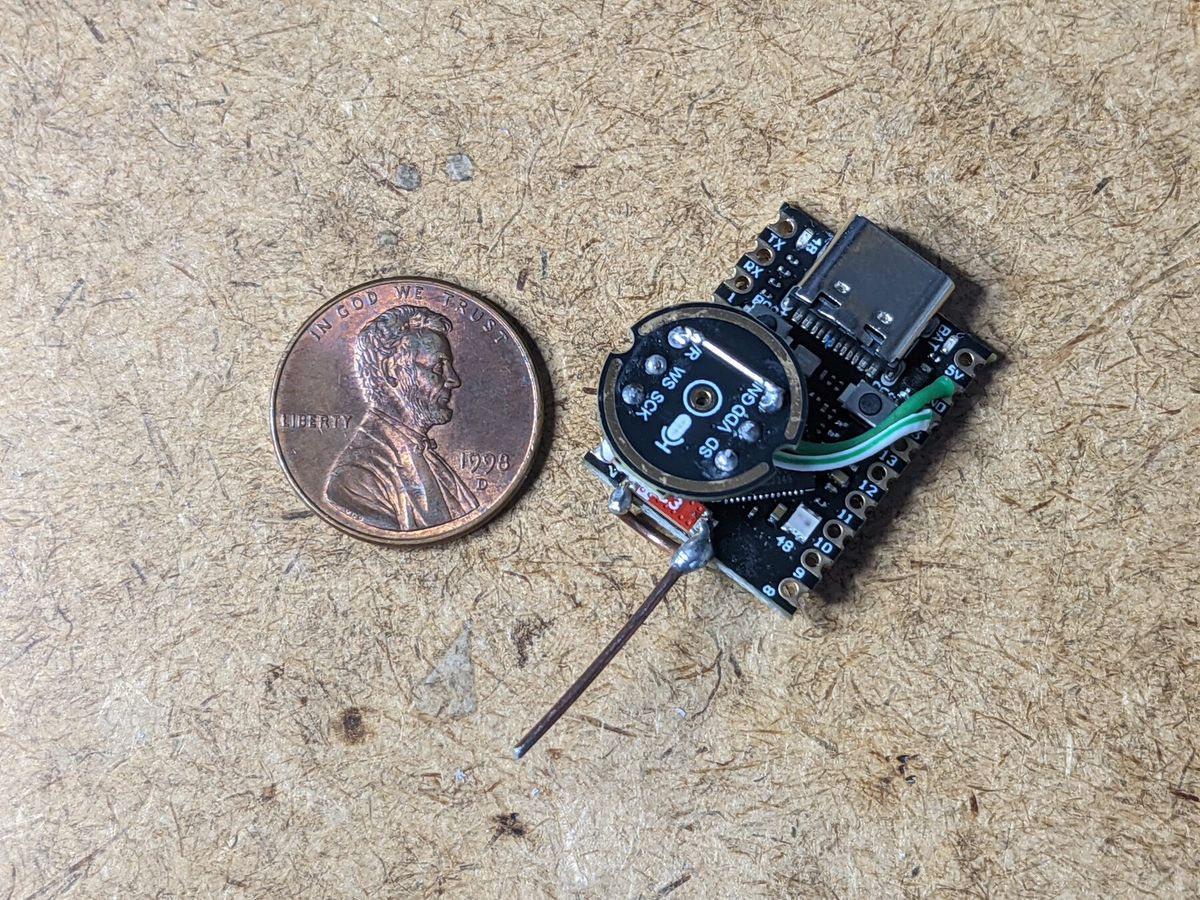
A whip antenna made of welding wire. The on-PCB chip antenna on the ESP32-S3 dev board is fine in the same room as the access point, less fine across the office. The fix turned out to be embarrassingly low-tech: a piece of welding wire cut to about 31mm (a quarter-wave at 2.4GHz), soldered to the board as a vertical whip. Cheap, slightly ugly, dramatically better. Reception went from “drops the connection in the meeting room” to “holds it on the far side of the office.” Sometimes the right antenna is a piece of wire you found in the workshop.
Bill of materials
For anyone tempted to build one. Per device — roughly $10 in parts (less per device if you buy a multi-pack, which is usually how these are sold), plus whatever the office already had on the bench:
| Part | What | Notes |
|---|---|---|
| Microcontroller | Supermini ESP32-S3 dev board | USB-C, tiny form factor. Cheap from online retail (~$5). |
| Microphone | INMP441 I²S MEMS mic | Soldered to the board. Wiring: WS → GPIO 5, SCK → GPIO 6, SD → GPIO 7, VDD → 3V3, GND → GND, L/R → GND (selects left channel). |
| Antenna | ~31mm of welding wire | Soldered to the U.FL pad as a quarter-wave whip. Any solid-core hobby wire of a similar gauge might work too — the length matters more than the material. |
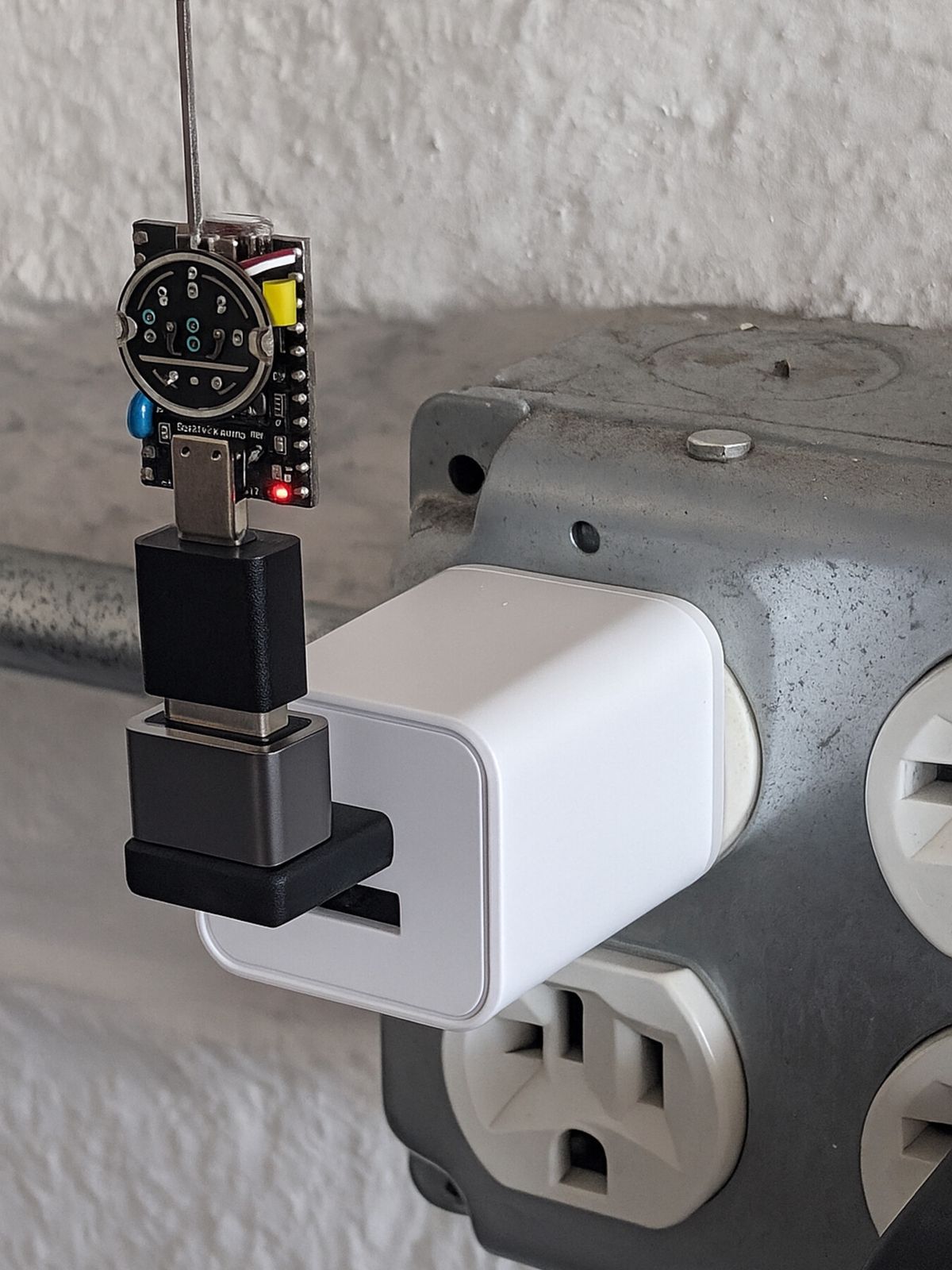
| Power | USB-C cable or 5V wall adapter | A small block-style charger does the job; we use whatever’s lying around. Add a USB-A → USB-C adapter if your wall block is the older USB-A kind. |
| Enclosure | 3D-printed Horton elephant | Optional but improves morale. |
| Misc | Solder, flux, a steady hand |
Server side: any computer that can run Python 3.12 and faster-whisper. CPU works for a small fleet; we run the medium model on a GPU box (RTX 4090) because we had one. A Mac mini would handle a handful of devices fine. SQLite per device means storage is cheap and stays cheap.
What’s next
The current Horton is honestly a great toy and a halfway-decent listening post. We have very good dashboards of a room full of microphones listening, mostly, to themselves.
What’s actually interesting is what to do with the transcripts. On-device wake-words, so the room knows when it’s being addressed instead of just heard. Per-room intent, so “kitchen” and “meeting-room” carry different default assumptions about what’s worth doing with what they hear. Maybe a small in-house model that summarizes a room over an hour and emits exactly one line that’s worth reading. We’re poking at all of those.
If you’ve got an ESP32 lying around and a computer fast enough to run Whisper, you can build the first version of this in a weekend. The hardware is the easy part. The harder question is what a fleet of devices that hear should actually do.
Horton is happy to keep listening in the meantime.